Time tracking by project and client, installed on your own server.

For agencies, consultancies and freelancers who bill by the hour. It installs on your hosting like WordPress, you pay once, and your team's hours never leave your server.

Buy for €149 was €149

€149 a month one payment · VAT included

Black Friday €149 instead of €149 until …, installation included.

  • No card needed for the trial
  • Unlimited users
  • In 14 languages
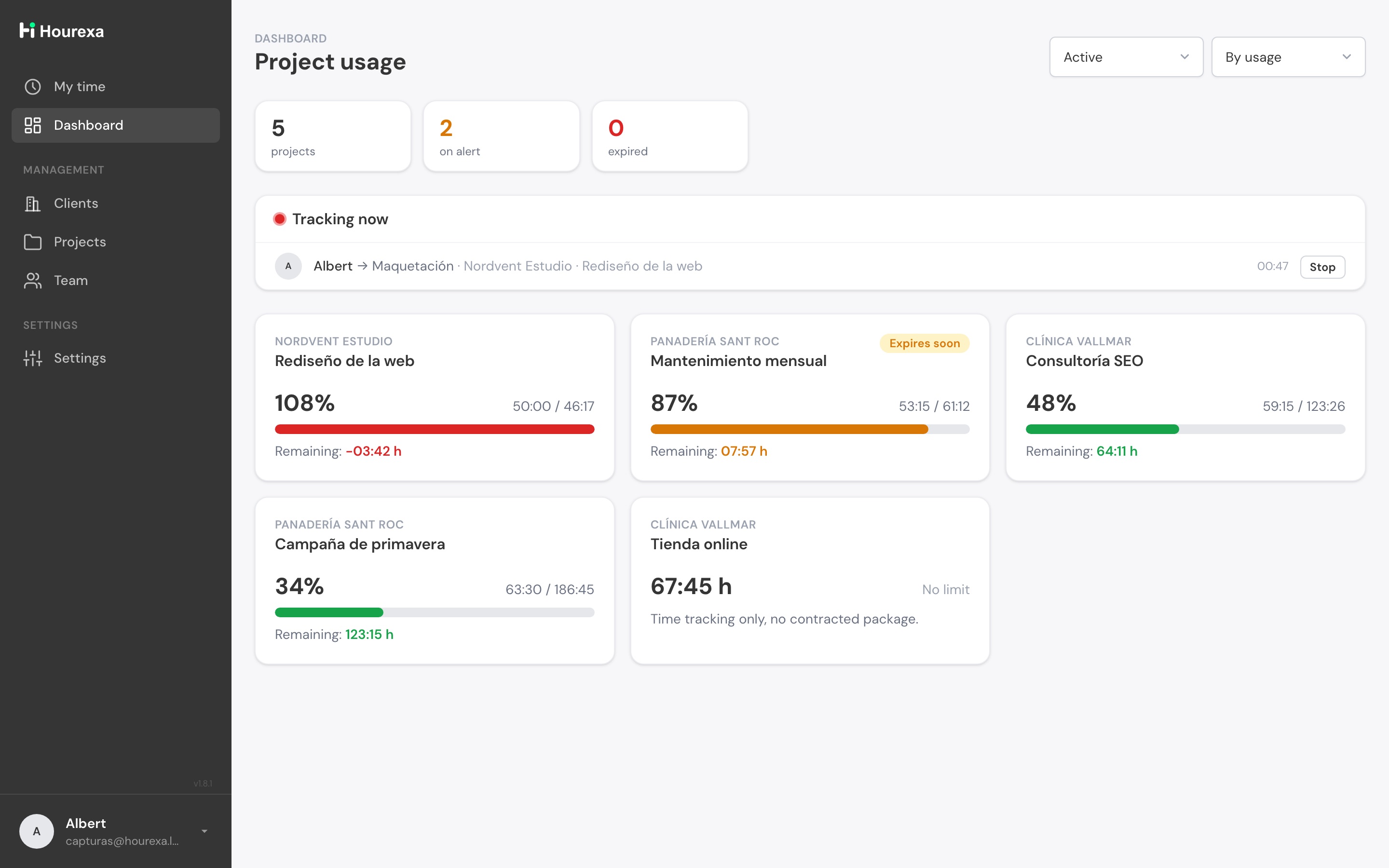
Hourexa dashboard with the consumption of five projects: one at 108 %, one at 87 % and the rest with room to spare
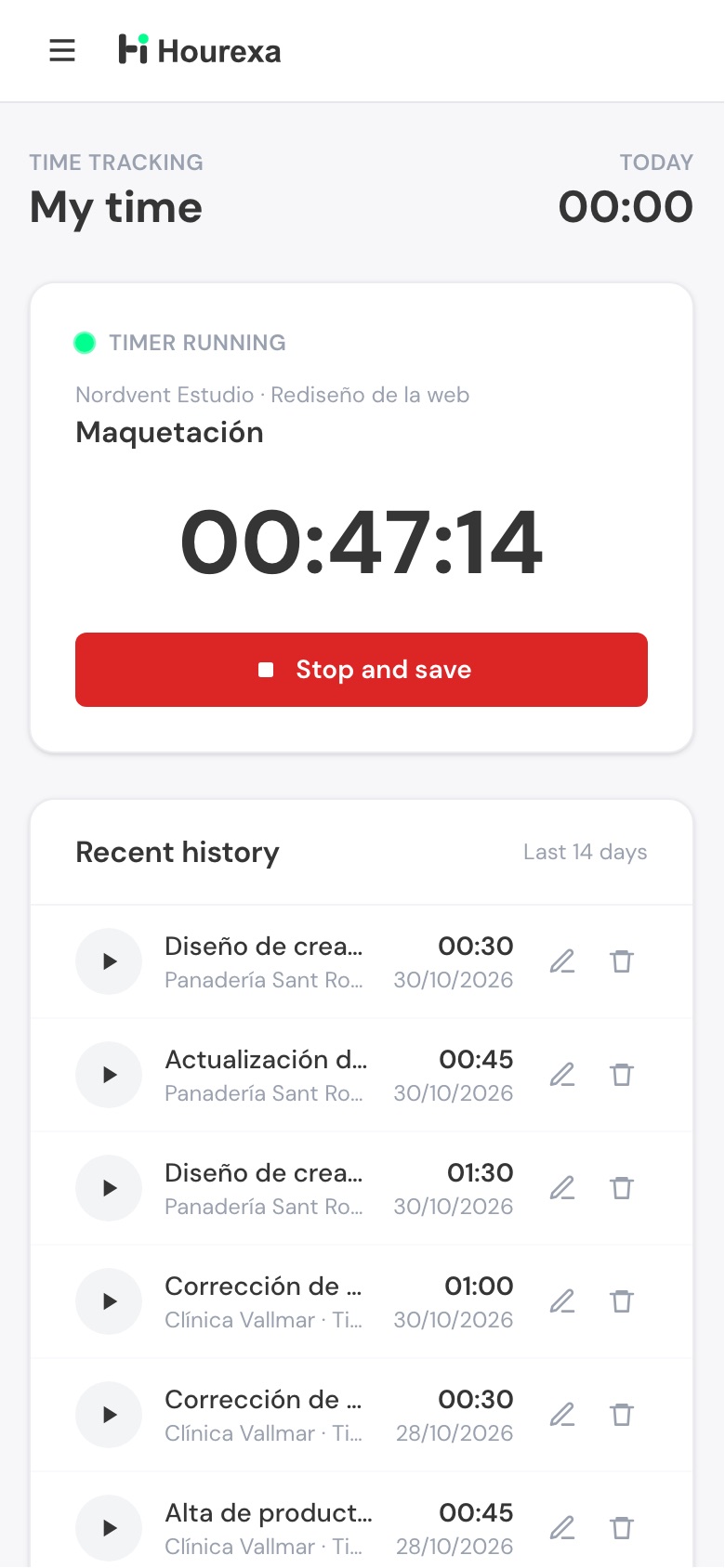
Hourexa on a phone: the My time screen with a timer running

What matters

Three differences from cloud time-tracking software

One payment

And nothing else

No subscription, no plans, no per-user fees. You pay once and the licence never expires: what you buy today is still yours in ten years.

Your hosting

Installs like WordPress

Upload the folder, open the installer and answer three questions. Almost any hosting with PHP and MySQL will do.

Your data

Never leaves your server

The app runs on your server and your team's hours stay there. We don't host them and we have no access.

Features

Log the hours of every project, watch the hour bank and show it to the client

Timer

One clear timer per person

Each person starts the timer on the task they're working on, from the browser or the phone. Manual entries when needed, and editing with permissions.

  • The dashboard shows who has a timer running and for how long
  • The last 14 days of history, one click away
  • Admins can stop any timer; the time is kept
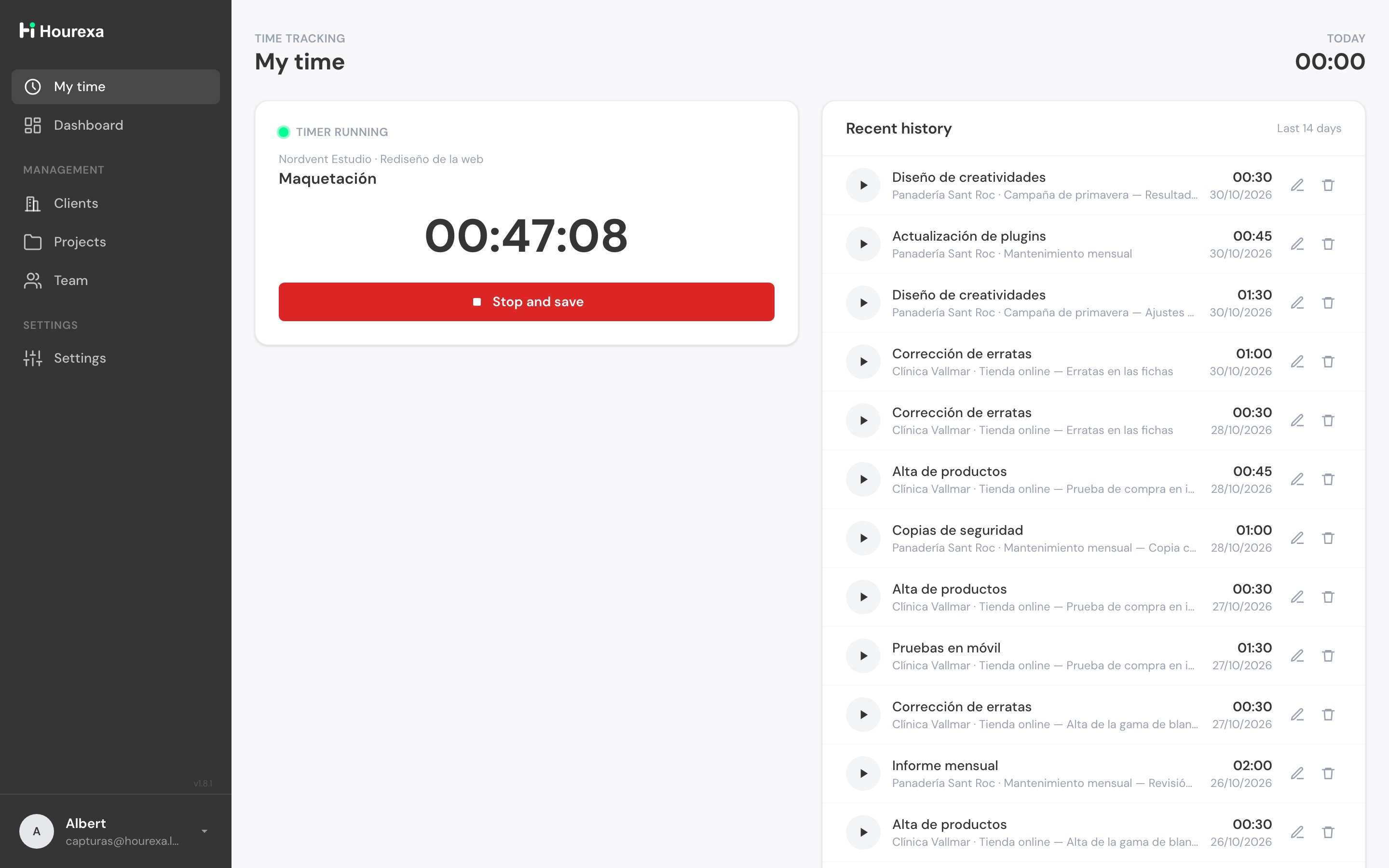
Hourexa My time screen: a timer running on the task Maquetación and the history of the last 14 days
Hour bank

Contracted hours with automatic alerts

Each project can have its own package of contracted hours. Consumption is always in view, with an email alert at the percentage you choose.

  • Several alerts per project, even above 100 % to catch overruns
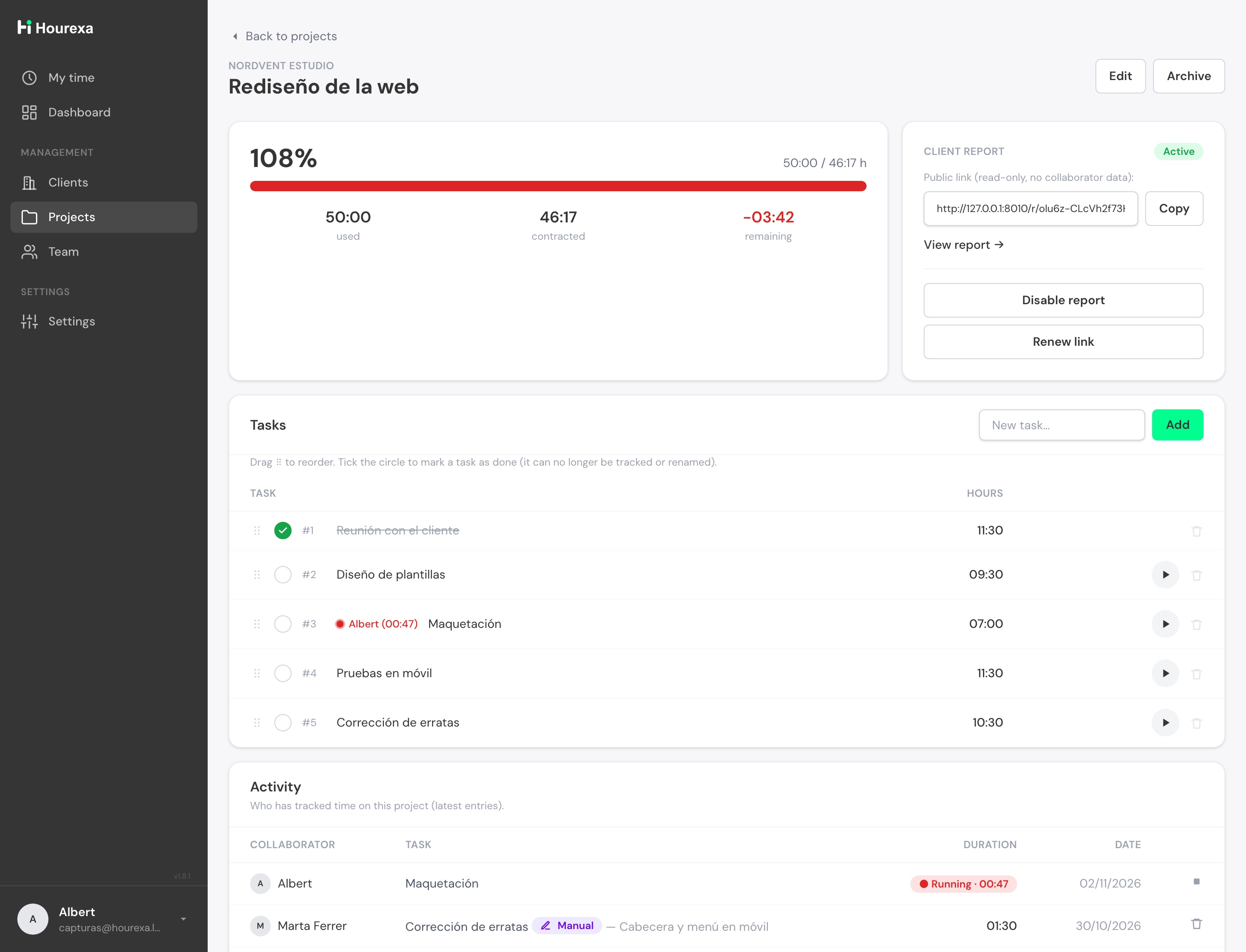
  • Tasks with their hours, reorderable and markable as done
  • What's left, in hours and as a percentage; an overrun project shows in red without looking for it
A project in Hourexa at 108 % of its hour bank, with hours used, contracted and remaining, and its tasks
Reports

Reports you can show

Per client and project, as a PDF with your logo or as a read-only link you share with your client without giving them access to anything else.

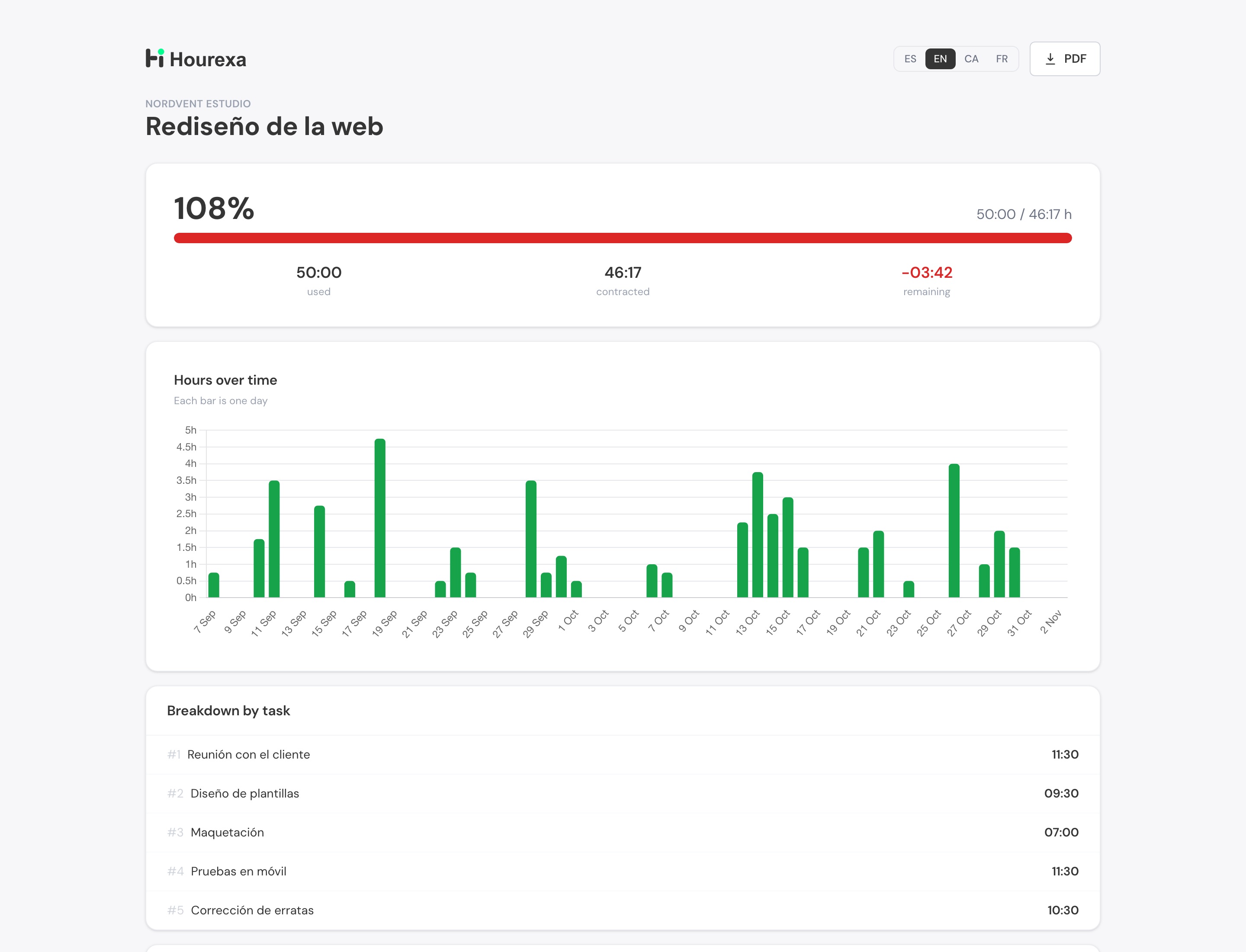
  • Hours over time, by day or by week, with a breakdown by task
  • The link never shows your collaborators' data
  • Renew or disable it whenever you want
Client report in Hourexa: percentage used, hours over time and breakdown by task

Also

What a small team needs, and no more

  • Team roles and two-step verificationOptional for each person, or required by role.
  • Your brandYour logos and colours from Settings: in the tool, in the client report and in the emails.
  • In 14 languagesEach person picks their own: English, Spanish, Catalan, French, German and more.
  • Import your TrackingTime dataClients, projects, tasks and hours, so you don't start from zero.

How it works

Your time tracking installed in three steps

  1. Buy and download

    You pay once, by card, securely. You download the software right away and receive your licence key and your invoice.

  2. Upload it to your hosting

    By FTP or with your panel's file manager, just like WordPress. If your hosting has PHP and MySQL, it works.

  3. Open the installer

    It checks the server, creates the database and your admin user. Enter your licence and your team starts logging hours the same day.

Requirements: PHP 8.1 or newer · MySQL or MariaDB · a domain with HTTPS. The installer checks everything before starting. Not sure? Check your hosting before buying.

Who it's for

For agencies, consultancies and freelancers who bill by the hour

Agencies and studios

Every client and project with its own hour bank. The alert arrives before the bad news.

Consultancies and firms

Hours per person and project, and monthly reports ready to attach to the invoice.

Freelancers with clients

Log what you work for each client, show it with a link and justify every hour.

Hourexa is for

  • Knowing how many hours each project and client has used
  • Controlling contracted hour banks and warning before they run out
  • Justifying hours with a report the client can open

Hourexa is not for

  • Recording start and end of the working day: it isn't an attendance system
  • Shifts, holidays or payroll
  • Invoicing: it gives you the hours; you invoice with your usual software

Price

One payment. No fees. Unlimited users.

You decide only one thing: who installs it. Everything else is the same in both options.

Black Friday + Cyber Monday

Until …, Hourexa costs €149 instead of €149, with installation included.

Recommended

Hourexa + installation

We leave it installed and running on your hosting.

Black Friday · until …
was €198

€198 a month one payment

VAT included

Buy with installation

What's different

  • We install it: you give us access to your hosting and we hand it back working
  • Hosting pre-check included
  • A date agreed with you, within 90 days of purchase

Hourexa

You install it yourself, like WordPress, with the guided installer.

Black Friday · until …
was €149

€149 a month one payment

VAT included

Buy without installation

What's different

  • You install it in three steps with the guided installer
  • You can check your hosting for free before buying

What it costs over three years

Toggl Starter5 people · $9 per person per month
$1,620 over 3 years
Hourexa5 people, or 50: no difference
€149 once

Toggl prices from its website, billed yearly, the same as in our comparison. Hourexa includes 6 months of new versions; extending them is optional, €49.

Both options include

  • Every feature, nothing cut
  • Unlimited users
  • 6 months of new versions and 3 of support
  • A licence for one installation, which never expires
  • 14 languages
  • Your data on your server

Right now both options cost the same: if in doubt, let us install it. You don't pay more for it.

Not ready for either? Try it free for 7 days: no card, nothing to install.

The exact tax is calculated at checkout based on your country. Secure card payment and instant invoice. Several installations? One licence for each. When the 6 months of new versions end, you can extend them: €49. Already bought it? Go to your panel.

Frequently asked questions

Self-hosted time tracking: frequently asked questions

Do I need to know how to code to install it?

No. If you've ever installed WordPress, this will feel familiar: upload a folder to your hosting, open the installer in your browser and it checks your server, creates the tables and your admin user. And if you get stuck, that's what support is for.

How is this different from Kimai or other open-source options?

Open-source tools like Kimai are free and capable, but they assume you are comfortable with servers: you install them, you update them, and support comes from whoever answers in the forum. Hourexa is a paid product for people who would rather not do that — you upload a folder, open the installer and you are done, and when something breaks there is someone whose job is to answer you. Same principle, your server and your data, with the setup and the support already solved.

What does my hosting need?

PHP 8.1 or newer with the usual extensions (pdo_mysql, mbstring, openssl, sodium and curl) and a MySQL or MariaDB database. Any regular shared hosting plan has all of it, and the installer checks everything before starting. If you would rather be sure first, download the hosting check and run it on your server: it makes the same checks as the installer.

Where is my team's data stored?

On your server and in your database — nowhere else. We don't host your installation and we can't access your data: we say it here and we commit to it in our terms of service.

Are there monthly fees or user limits?

No and no. You pay €149 once and create as many users as you need: the price doesn't depend on your team size, and the license never expires.

What's included, and what happens afterwards?

The complete software (there are no plans), your license key, 6 months of new versions and 3 months of support. When they end, the app keeps working exactly the same and the license never expires; if you want to keep receiving new versions or support, you can renew them from your customer panel whenever you want.

Can I move to another hosting or domain later?

Yes. Your license covers one installation (one domain and folder). If you move, release the installation from your customer panel and activate the same key on the new one. If you need to move it unusually often, write to us and we'll help.

Can I try Hourexa before buying?

Yes. We set up your own Hourexa for 7 days, with sample data inside so you can see it working on a real project: you leave your email, we send you the link and that's it. Nothing to install and no card. . And for any specific question, write to info@hourexa.com: humans answer, not robots.

I'm coming from TrackingTime — can I bring my data?

Yes. Hourexa includes an importer that connects to your TrackingTime account and brings over clients, projects, tasks and hours, without duplicating anything if you run it several times. Switching doesn't cost you your history.

Do you issue invoices?

Yes, with the applicable VAT, downloadable as a PDF from your customer panel as soon as you pay. The exact tax is calculated at checkout based on your country and tax details.

Try it with sample data for 7 days

We set up your own Hourexa in a minute. No card and nothing to install: you log in and see it working.

See the price

Questions before buying? Ask us or write to info@hourexa.com